Tour of Restish
This tour shows the shape of Restish before you commit to a local setup. You
can run the examples in your browser against the live docs API at
https://api.rest.sh, edit the commands, and then use the same commands in a
terminal after installing Restish.
Restish is an API-aware HTTP CLI. It works as a direct request tool when you have only a URL, and it can also learn an API from OpenAPI so repeated work gets generated commands, auth, profiles, completions, filtering, pagination, and output formats.
Try It Here Or Locally
The browser examples are previews of the real CLI. They make live requests to the docs API when the browser can do that safely, and they use small built-in fixtures for local-only or streaming behavior that a web page cannot reproduce exactly. Browser previews cannot read stdin or write local files; otherwise the commands are the same. The Go CLI remains the source of truth for command behavior.
To follow along locally, install Restish.
Make A Direct Request
Start with a URL. No config, generated client, or API registration is required.
Restish sends a GET, decodes the response, and renders it in the default
auto terminal format.
The https://api.rest.sh/types endpoint returns a few different types of data,
so it’s a good way to see how Restish will render it. Give it a try by
pressing “Run” below:
For quick exploration, the verb and scheme can be optional. These commands are equivalent in normal use:
restish get https://api.rest.sh/typesGET when there is no body
scheme inferred as https:// for host-like URLsrestish api.rest.sh/typesUse the explicit verb when it helps a script or a teammate understand intent. Use the shorter form when you are exploring interactively.
You can use -v or --rsh-verbose to see the request/response details, which
can help you to debug what is being sent and received. Note: some sensitive
values are redacted in verbose mode, such as the Authorization header.
Learn more: Requests, HTTP Commands, Troubleshooting.
Filter Responses
API responses are often larger than the thing you need. Filtering lets you turn a full response into the few fields you want to read, paste into a ticket, pass to another command, or use in a script. You can keep the original request broad while making the output narrow.
Restish normalizes responses before filtering them, so the same filter model works across direct URLs and generated API commands. That gives you stable roots for the pieces you usually care about:
{
  "proto": "HTTP/2.0",
  "status": 200,
  "headers": {
    "Content-Type": "application/json"
  },
  "headers_all": {
    "Content-Type": ["application/json"]
  },
  "links": {
    "next": "https://api.rest.sh/items?cursor=abc123"
  },
  "body": {
    "greeting": "Hello, world!"
  }
}
Filters can select from proto, status, headers, headers_all, links,
and body across different APIs. Restish shorthand is meant to cover the
common cases without making you write a full query program:
- Field selection
body.idselects one fieldbody.{id, name}selects some fields
- Array Item
body.items[0].{id, name}selects one array item’s fields
- Array Slicing
body.items[0:2].{id, name}selects some fields from several items
- Fields from All Items
body.items.{id, name}selects some fields from all items
- Array Filtering
body.items[name == "demo"]keeps array items with a matching field value
- Pipes to Reset Processing
body.items[name == "demo"]|[0].idkeeps matching items and picks the first one’s ID
- Metadata Examples
links.nextorheaders.Content-Typeinspects response metadata{id: body.id, ct: headers.Content-Type}combines metadata + body
Those patterns are enough for a lot of day-to-day API work. Use them to trim the response first, then choose an output format that fits what you are doing.
Here is a projection over a real nested response:
Shorthand can also select array items:
If you prefer jq, use jq-style filters with a leading .:
restish api.rest.sh/example -f '.body.volunteer[] | {organization, summary}'
restish api.rest.sh/example -f '.body.skills[] | select(.name == "API Technologies") | .keywords'
Learn more: Filtering, Query Syntax, Shorthand.
Choose Output Formats
Restish chooses output from context first: is stdout an interactive terminal, or is it redirected to another program or file? Then it looks at whether you asked for a filter or output format.
Interactive Terminal
auto print mode shows response status, headers, and a body presentation for humans.
Redirected stdout
Restish preserves payload bytes until you ask it to transform the response.
-o: write response body bytes
Filtered pathfilters, metadata shortcuts, collection, or -o: render the selected valueBody Output Format
Use -o to choose the body format and --rsh-print to choose which HTTP
exchange parts are printed. Redirected transformed output is pretty by default;
pass --rsh-print=b when compact rendered JSON matters.
JSON is the safest handoff to other structured tools:
Tables are useful when you want to scan a collection. You can optionally choose which fields to show as columns with --rsh-columns:
gron flattens JSON into assignment-like lines that are easy to search with grep as they give you the full path to the found item:
Image responses can render directly in capable local terminals. Restish uses native terminal image protocols when available, including Kitty graphics and iTerm2-style inline images, and falls back to Unicode half-block rendering when it cannot use an inline image protocol.
The command uses Restish’s normal output default for an image/* response in a terminal. Redirect the response when you want to save the bytes instead.
Learn more: Output, Output Formats, Output Defaults, Images in the Terminal.
Save Files
For binary responses, the local CLI can write response bytes directly to a file. The browser preview can’t.
Run the download locally:
# Redirect output to save the body bytes to a file.
restish api.rest.sh/images/jpeg > image.jpg
restish api.rest.sh/bytes/64 > sample.bin
The same rule applies to structured responses. Redirecting without -o saves
the response body bytes. Choose -o json when you want Restish to decode any
supported response format and render JSON for a script:
# Output a JSON representation even if the server sends CBOR or YAML.
restish api.rest.sh/formats/yaml -o json > example.json

# Save the response raw body bytes.
restish api.rest.sh/formats/yaml > example.yaml
Learn more: Content Types, Output, Save a Response Unchanged.
Submit Data
Restish can send bodies with POST, PUT, and PATCH using stdin and/or command-line input.
The next two commands send the same request. Restish can infer the method from
the body, infer https:// for a host-like URL, and turn shorthand into the same
JSON structure:
restish post https://api.rest.sh/ '{"one": {"two": 123}}'POST
scheme inferred as https://
body written as shorthandrestish api.rest.sh/ 'one.two: 123'Restish shorthand is a compact way to build structured request bodies without writing JSON by hand. Think of it like a better JSON, where quotes are optional, dots denote nesting, and you can append to arrays easily.
| Shorthand | JSON |
|---|---|
| Most things just work: | |
user.name: Alice | {"user": {"name": "Alice"}} |
price: 12.34, inStock: true | {"price": 12.34, "inStock": true} |
| Deep nesting can be simpler: | |
base{one: 1, two.three: 3} | {"base": {"one": 1, "two": {"three": 3}}} |
| Arrays can be appended: | |
tags[]: red | {"tags": ["red"]} |
tags[].id: 123 | {"tags": [{"id": 123}]} |
For example, this shorthand:
restish api.rest.sh/ 'user.name: Alice, active: true, tags[]: docs'
builds this JSON body:
{
  "user": {
    "name": "Alice"
  },
  "active": true,
  "tags": ["docs"]
}
Quote shorthand when it contains spaces, brackets, or characters your shell might interpret.
The docs echo endpoint returns the parsed request body under body.parsed, so
the filter shows exactly what Restish sent.
For forms, choose the content type and keep the same shorthand body model:
Use stdin for larger payloads in a local terminal:
restish post api.rest.sh/post < payload.json
The stdin payload can be combined with the command-line body for more complex shapes or template scenarios (where appending can come in handy).
Learn more: Input and Shorthand, Content Types, Post JSON From A File.
Edit A Resource Client-Side
For resources with a GET and PUT shape, restish edit fetches the current
representation, lets you change it locally, and sends the updated version back.
That is useful when an API exposes whole-resource updates and you want a safer
workflow than hand-building a large PUT.
The browser preview shows the one-shot edit shape against the docs fixture:
GET /types returns a small JSON document with fields such as boolean and
number, so the patch below has visible fields to update.
In a real terminal you will see a diff before submitting the data and if ETags are present then Restish will use them to not overwrite other people’s edits. With no
patch arguments, restish edit opens your editor by default:
restish edit api.rest.sh/types
If the API provides a $schema link in the returned resource body, your editor may be able to use that for live validation and completion as you edit the resource. It will be able to validate things like the data structure shape, required fields, field types, enum values, min/max values, and more depending on the schema and editor.
Restish compares normalized content, so formatting-only changes do not count as resource changes. Use dry runs and confirmations for APIs where updates matter.
Learn more: Edit Workflow, Edit Command.
Follow Pagination And Links
When a collection exposes a recognized next link, Restish can follow pages for
you automatically. Output streams as pages arrive, and safety limits prevent a surprise crawl from running forever (i.e. up to 25 pages by default, see --rsh-max-pages).
Inspect the links Restish can see:
Then let Restish fetch the collection and filter each item as it arrives:
Use --rsh-no-paginate when you only want the first page:
Some filters need the whole collection at once. Use --rsh-collect for those,
knowing that output waits until all pages are fetched and the collection is held
in memory.
Learn more: Pagination and Links, Links and Hypermedia, Commands.
Stream Events And Logs
Restish understands Server-Sent Events, NDJSON, and JSON Lines. It processes records as they arrive instead of waiting for a complete document, and JSON event payloads can be filtered like normal responses.
Always bound stream examples when you only want a sample:
The /logs endpoint emits records with fields such as message and
timestamp.
SSE events preserve event metadata and parsed event data, so note they use body.data instead of just body when filtering:
Learn more: Streaming, Output Formats.
Handle Slow Or Flaky APIs
Daily API work needs guardrails. Restish supports timeouts, conservative retries, HTTP caching, and cache management so scripts and interactive sessions do not hang indefinitely or redo unnecessary network work.
Use a timeout when a command should fail predictably:
Restish retries safe transient failures for GET and HEAD. You can tune the
attempt count for one command:
Use cache commands when you need to inspect or clear stored responses. Add
--rsh-no-cache to a request only when you want to bypass a cached response
while debugging freshness:
restish api.rest.sh/cache --rsh-no-cache
restish cache info
Learn more: Retries and Caching, Commands, Global Flags.
Register An API
Direct URLs are great for exploration. When you use the same API often, you can register it with a short name. Restish discovers OpenAPI documents, stores API configuration, and generates commands from operations when it can.
# Connect to the API and give it a short name `example`.
restish api connect example api.rest.sh

# See the generated commands for the API.
restish example --help

# See inputs, outputs, schemas, and examples for a generated command.
restish example list-images --help
The browser tour has the example API preconfigured so you can try generated
commands without installing anything first:
API authors can use Restish’s OpenAPI extensions to improve command names, setup prompts, examples, and auth configuration for their users.
Learn more: Connect to an API, API Setup and Discovery, API Management.
Calling Generated Commands
Generated commands are still normal Restish requests. Profiles, auth, TLS, retries, pagination, filters, and output formats still apply. The difference is discoverability: the API name and operation name replace a long URL and a pile of remembered parameters.
Once registered, you can use any of the generated commands, short-name URLs, or full URL and they will do the same thing. These commands reach the same collection:
restish example list-images -o table
restish example/images -o table
restish api.rest.sh/images -o table
The operation form gives you generated help, and all forms can use shell completion:
restish example get-image --help
Try a generated command yourself in the browser:
Learn more: Connect to an API, OpenAPI Reference, Commands.
Add Authentication
Restish can send auth directly with headers or configure credentials in an API profile. For OpenAPI-described APIs, operations define which auth schemes they need, and Restish matches those requirements with configured credentials.
A direct bearer-token request looks like this:
After connecting an API locally, generated commands can apply configured auth for you:
Verbose output redacts sensitive values, so you can confirm that auth was added without leaking the credential into logs.
Use restish api auth inspect example to see every configured credential’s
computed auth material. Add --redact only when you need output that is safe to
share.
Learn more: Authentication, Commands, OpenAPI Reference.
User Profiles
Profiles keep environment URLs, headers, auth, and other repeated settings out
of individual commands. Each API has a default profile, and you can add more
for staging, production, different users, or different auth modes.
This local command creates a profile for the docs API:
restish api set example \
  'profiles.tour.auth: {type: http-basic, params: {username: tour, password: pass}}'
Then call the same generated command with that profile:
restish example get-auth-basic -p tour
Profiles are most useful when the command should stay the same while the environment or credential changes.
Learn more: Set Up Profiles, Profiles Reference.
Customize Local Output
Restish is meant to be comfortable for daily terminal use. Themes control auto output styling, and shell setup protects Restish’s bracket-heavy filters and shorthand from shell globbing.
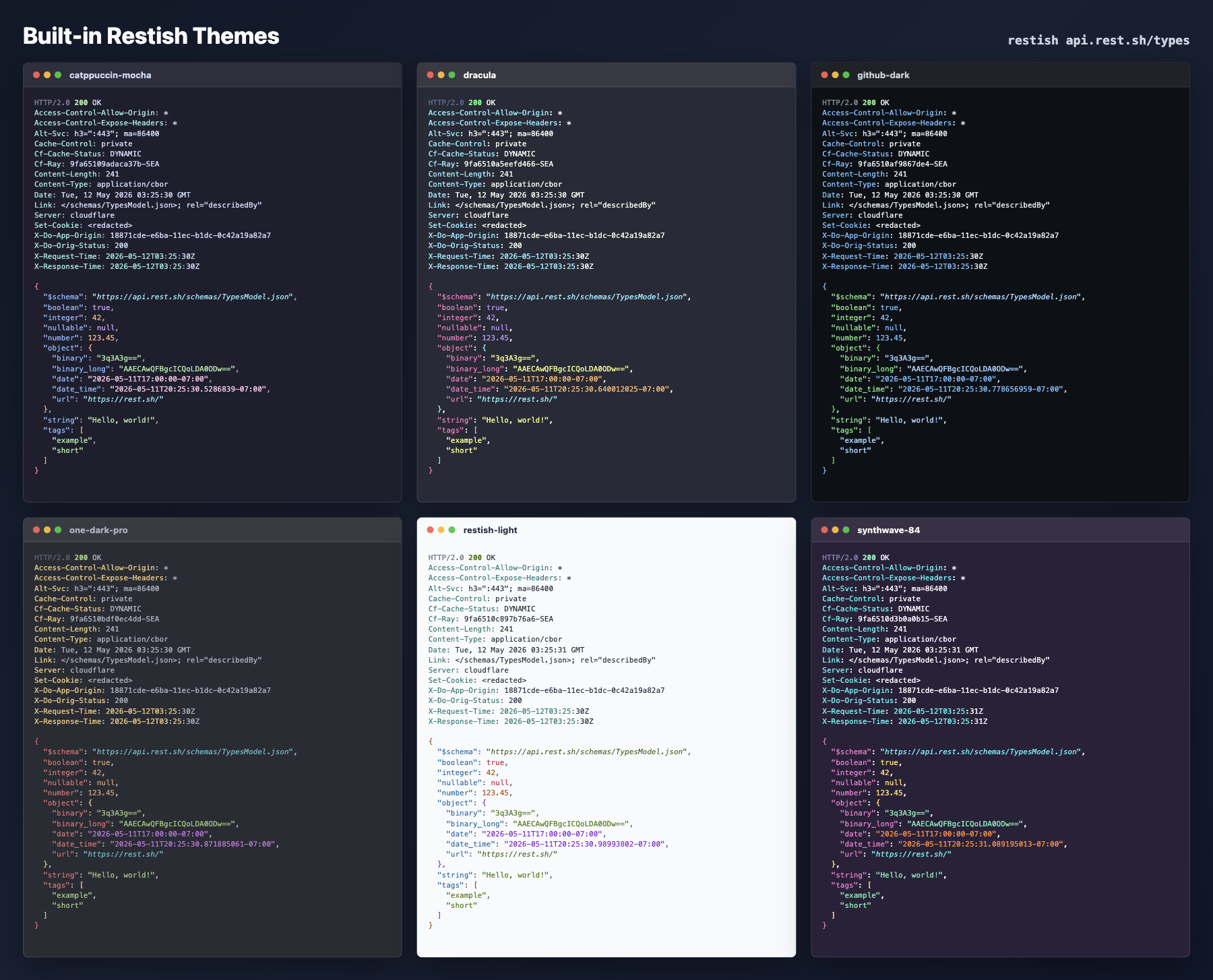
# See official theme names, then set one
restish config theme list
restish config theme set one-dark-pro
restish config theme set restish-dark

# Install and set custom themes from a local path, URL, or repo
restish config theme set ./theme.json
restish config theme set user/themes dark

# Shell setup (argument processing & command completion)
restish shell setup zsh
Shell setup is especially valuable if you use query strings, array shorthand, or filters in an interactive shell. Completion can also use connected APIs so generated commands and parameters are easier to discover.
Learn more: Shell Setup and Commands.
Extend With Plugins
Plugins add functionality outside the core binary. Hook plugins can add formatters, auth, middleware, or spec loaders. Command plugins can provide larger workflows, such as bulk resource management or MCP integration, while still delegating HTTP and formatting back to Restish.
Official plugins cover a few common extension points:
| Plugin | Adds | Use it when |
|---|---|---|
restish-csv | CSV output with -o csv for array-shaped responses. | You want to hand API lists to spreadsheets, data tools, or shell scripts that expect comma-separated rows. |
restish-bulk | A restish bulk command for checking out API collections as local files, then pulling, diffing, and pushing changes. | You need to review or edit many resources with local tools while keeping Restish profiles, auth, retries, and validators in the HTTP path. |
restish-mcp | A restish mcp serve command that exposes registered OpenAPI operations as MCP tools. | You want an MCP client or agent to call APIs through Restish instead of building separate auth and HTTP handling. |
restish-pkcs11 | A PKCS#11 TLS signer for mTLS handshakes. | Your client private key lives in a hardware token, smart card, HSM, or PKCS#11 provider and should not be copied into Restish config. |
Install the CSV formatter locally from the official release:
restish plugin install rest-sh/restish csv
For plugin development, build ./cmd/restish-csv from this repository and
install the local binary with restish plugin install ./restish-csv.
The browser preview includes a small CSV formatter so you can see the result:
Learn more: Install and Use Plugins, Plugin Command, Plugin Messages.
Script With Restish
Restish keeps stdout useful for response data and diagnostics on stderr, so it fits normal shell pipelines. The most common scripting pattern is to filter down to the values that you need. Scalar values are output without quotes, so they are easy to use in shell assignments:
For a list, filter the field you want and use the lines output format to get one value per line without quotes or JSON array syntax:
Then use those values in your shell:
for URL_PATH in $(restish example list-books -f body.url -o lines); do
  restish "example$URL_PATH" -f 'body.{title, author, rating_average}'
done
Use -o json when a downstream tool expects structured data, -o ndjson for
records, and -o lines only when the filtered output is an array of scalar values.
Exit Codes
Restish keeps process exit codes compact so scripts can branch on success, runtime failure, usage mistakes, and interrupts:
| Result | Exit code | Notes |
|---|---|---|
Successful command, including final HTTP 2xx responses | 0 | Redirects are followed before the final status is evaluated. |
Final HTTP 3xx response | 3 | Redirects are followed before the final status is evaluated. |
Final HTTP 4xx response | 4 | Restish still writes the response body before exiting non-zero. |
Final HTTP 5xx response | 5 | Restish still writes the response body before exiting non-zero. |
| Runtime failure | 1 | Network errors, TLS failures, config problems, auth failures, parse errors, formatter errors, and most plugin failures. |
| Usage error | 2 | Missing arguments, unknown commands, unknown flags, or invalid flag values before the request runs. |
Interrupted with Ctrl-C / SIGINT | 130 | Matches the usual shell convention for interrupted processes. |
| Command plugin exit code | plugin-defined | Command plugins may return their own 0-255 exit code. |
That behavior is what you usually want in scripts because set -e, CI jobs,
and shell conditionals can stop on API failures. When an error response body is
the data you want to inspect, opt out for that command with
--rsh-ignore-status-code:
Learn more: Output, Filtering, Get One Field From Every Item, Command Behavior.
Where To Go Next
Choose the next page based on what you are trying to do:
- Install locally: Install, then Shell Setup.
- Make one-off requests: Requests and Input and Shorthand.
- Connect your own API: Connect to an API and OpenAPI Reference.
- Configure auth and environments: Authentication and Set Up Profiles.
- Shape output for humans or scripts: Output, Filtering, and Output Formats.
- Debug failures or slow APIs: Troubleshooting and Retries and Caching.
- Work with content negotiation and files: Content Types and Save a Response Unchanged.
- Work with collections or streams: Pagination and Links and Streaming.
- Extend Restish: Install and Use Plugins and Plugin Quickstart.
The Example API lists the live endpoints used throughout the docs, including request echoes, auth fixtures, pagination, streaming, content negotiation, retries, errors, and safe CRUD examples.